Building a model
Section editor
Build fiber sections from templates, AISC shapes, fibers and patches.
Fiber sections are built in the section editor. Open it with Open Section Editor… from the Command panel, or click a fiber section in the Model panel (titled New Fiber Section or Edit Section #n).
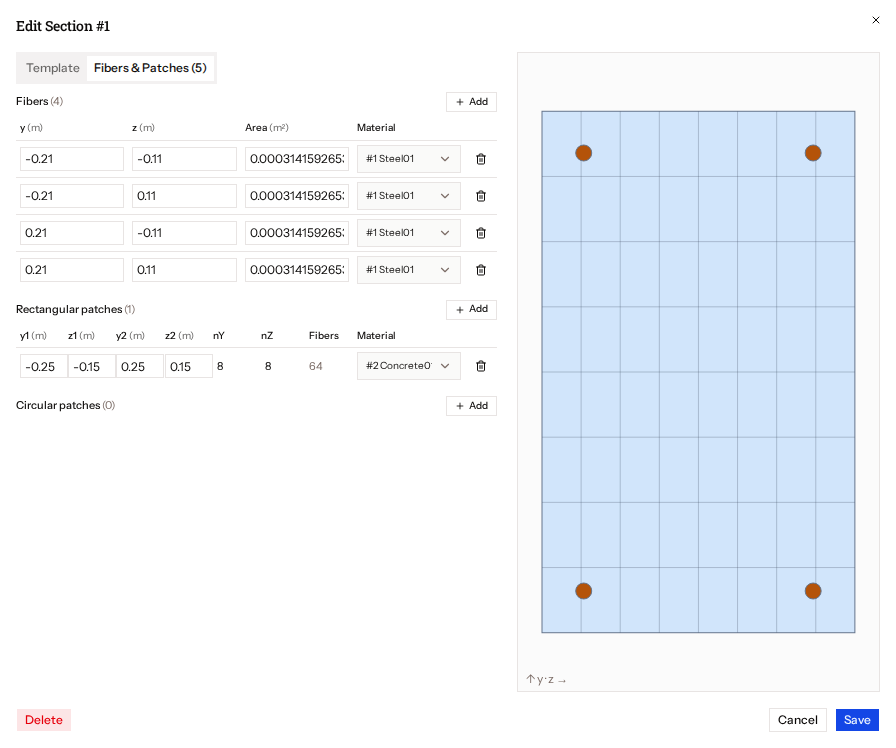
Layout
Two tabs on the left and a live preview on the right:
- Template: start from a parametric shape. See Section templates and AISC shapes.
- Fibers & Patches: add or edit individual fibers, rectangular patches and circular patches. See Fibers and patches.
- The preview draws the section. Hovering a row highlights the matching fibers.
Rules
- Every fiber, patch and layer needs a uniaxial material with usage stress–strain.
- In a 3D model the section needs torsional stiffness (
GJ), unless it includes a torsion material. - Geometry is checked before you can save.
- Editing or adding a row detaches the section from its template; the template parameters no longer drive it.
Buttons
Save, Cancel, and Delete (with an inline confirmation).