Getting started
Interface tour
The menus, panels and viewport of PySees Studio.
Studio has a top menu, three resizable panels and a bottom bar.
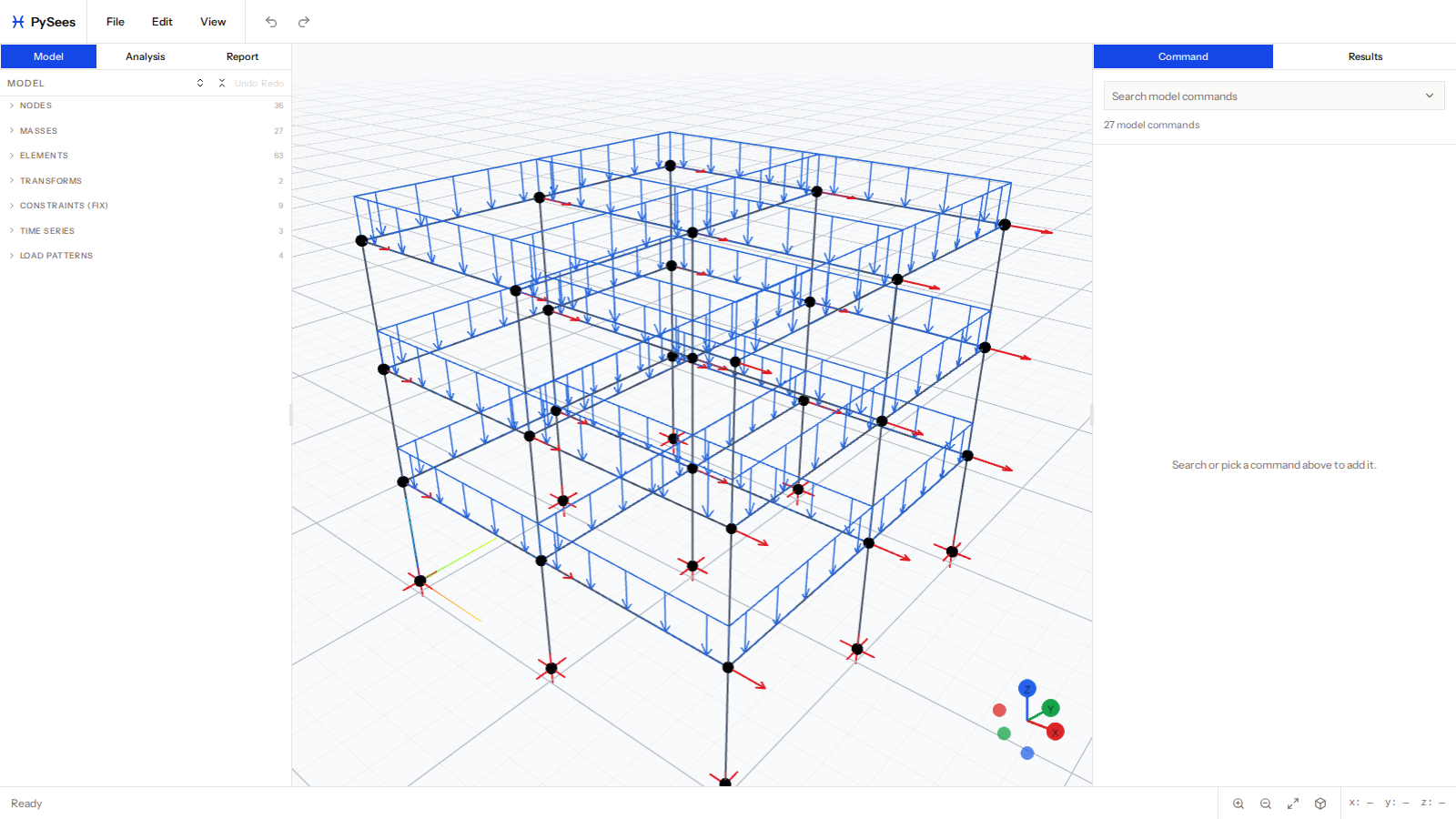
Top menu
| Menu | Items |
|---|---|
| File | New Model, Open .py, Save .py, Import .tcl / .py, Export .tcl |
| Edit | Undo, Redo, Grids & Levels, Units |
| View | Node and element IDs, show or hide nodes, elements, supports and loads, load values, per-pattern visibility, grids, levels, zoom |
Left panel
Three tabs:
- Model lists every entity in groups with counts: nodes, masses, materials, sections, elements, transforms, beam integrations, constraints, time series, load patterns and more. Click a row to edit it.
- Analysis is the ordered list of analysis commands, with the Run button and status.
- Report holds the plots you saved.
Centre: viewport
The 3D scene. Results controls float over it. See Navigation and selection.
Right panel
- Command shows the form for whatever is selected, or a search box to add a new command.
- Results shows recorded results as tables.
Bottom bar
Zoom in, zoom out and fit to view.
Keyboard
Esc closes the delete dialog and clears the current selection. Shortcuts are ignored while you type in a field.